
Create Columns Through Display Options
Content Property areas supports different Display Options, these options allow you to configure a Block or Partial Page View’s layout allowing them to either appear Full Width, 1/4 Width, 1/3 Width, 1/2 Width, 3/4 Width, or 2/3 Width. The Automatic option is selected by default, which means that the content is using the layout specified by the content area.
Note: You can change display options for blocks in the Background Container (BC) content property. BC’s should always be Full Width.
Display Options Available
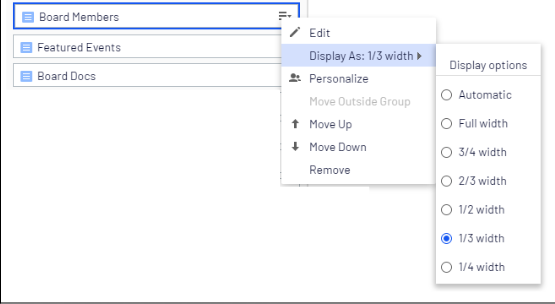
- Automatic
- Full Width
- 1/4 Width
- 1/3 Width
- 1/2 Width
- 2/3 Width
- 3/4 Width
Example
The three Link Cards below have their display set to 1/3 Width.


